Back to Home

Track crypto wallets in Liquify

Paste a public address, then pick the network and stablecoin that match what you see on a block explorer—so Liquify tracks the allowlisted stablecoin balance you actually hold.

Who this is for

Anyone on Liquify Ultra—including the free 30-day trial—who wants to watch allowlisted stablecoin balances from a public wallet. Liquify never asks for a seed phrase or private key; it only reads public on-chain data.

Before you start

  • Liquify Ultra (subscription or free 30-day trial)
  • A public wallet address (EVM 0x… or Solana)
  • The network and stablecoin you want to track (for example Celo + USDC)

Check your wallet on a block explorer

1. Track your wallet in Liquify

In Liquify open Crypto wallets, then Track crypto wallet. Paste your public address (EVM 0x… or Solana). Liquify stores the address only—no private keys.

You can track up to 10 wallets per person. Use Try demo wallet anytime to preview the flow without your own address.
2. Link network and stablecoin to a box

On Accounts, edit a box and link a crypto account: choose the tracked wallet, then the network (Celo, Base, Linea, Gnosis, Monad, or Solana), then an allowlisted stablecoin for that network (for example USDC, cUSD, or EURe).

Liquify shows that stablecoin’s balance on the box. Native gas tokens (CELO, ETH, SOL, and so on) are not linked—only allowlisted stables.

3. Example: Celo account with dollars

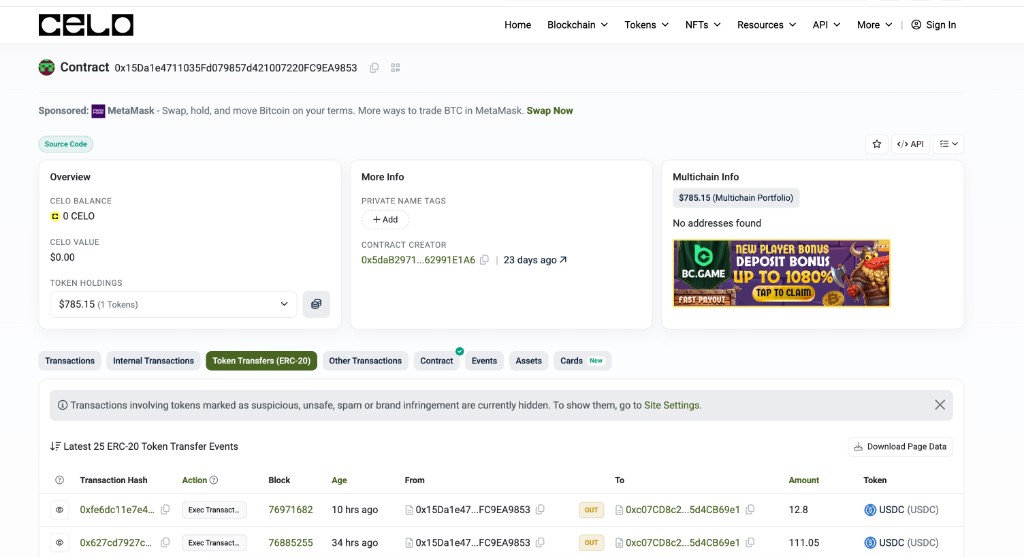
On Celoscan, an address can show 0 CELO and $0.00 CELO value while Token Holdings still show hundreds of dollars. Open Token Transfers (ERC-20): if you see USDC moving in and out, those are your dollars on Celo.

Celoscan contract page with 0 CELO balance but Token Holdings of about $785 and USDC transfers
Celoscan — CELO balance can be zero while Token Holdings show USDC dollars.

In Liquify, link that wallet with network Celo and stablecoin USDC (or cUSD if that is what you hold). Do not expect the native CELO balance to appear—pick the token from Token Holdings that matches your dollars.

You’re done when…

Crypto wallets lists your address, and the linked box on Accounts shows the stablecoin balance from that network.

Balances update when Liquify syncs (about every 6 hours), or tap refresh on the Crypto wallets screen. They can look stale until transfers settle on-chain.