Overview
Bank sync in Liquify is free on every plan. In the US and Canada you can bring your own SimpleFIN Bridge account: SimpleFIN connects to your banks, you paste a one-time setup token into Liquify, and Liquify reads balances and transactions. Liquify never sees your bank password. SimpleFIN bills you directly. Outside North America, use Lunch Flow; in Brazil, use Meu Pluggy. Coverage and limits: Bank Sync.
Before you start
- A signed-in Liquify account
- A SimpleFIN Bridge account with your banks connected
- A US or Canadian bank supported by SimpleFIN
- About 10 minutes
- Up to 10 SimpleFIN banks in Liquify
SimpleFIN links
bridge.simplefin.org
Create your account, connect your banks, and create setup tokens.
1. Connect your banks in SimpleFIN
Sign in to SimpleFIN Bridge and connect each bank you want in Liquify. SimpleFIN handles the bank login; Liquify only receives the data SimpleFIN shares.
2. Create a setup token
In SimpleFIN Bridge, create a new setup token for Liquify and copy it. A setup token works once: Liquify exchanges it for a private access link the first time you paste it. If the connection fails, create a new token.
3. Paste it in Liquify
In Liquify open Connect bank, choose SimpleFIN, tap Connect, and paste the setup token. Liquify adds every bank on that SimpleFIN account and starts importing. The access link is stored encrypted and only used to sync—you can revoke it in SimpleFIN Bridge any time.
To add a bank later, connect it in SimpleFIN Bridge, create a new setup token, and paste it in Liquify; banks already in Liquify are kept.
4. Check names and account type
On Connect bank, open Edit bank to rename the bank and its accounts. SimpleFIN doesn’t say whether an account is a credit card, so Liquify treats accounts with a negative balance as credit cards; switch Account type if one is wrong.
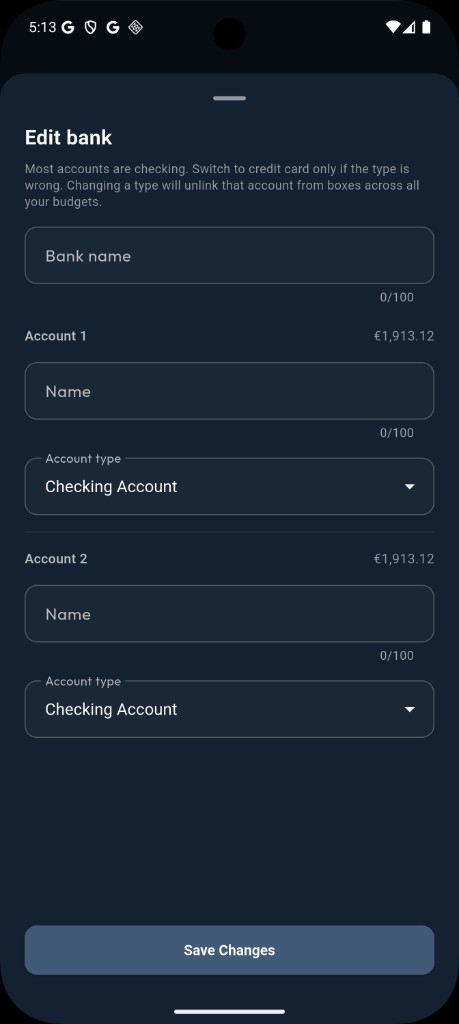
Edit bank — rename accounts and correct checking vs credit card.
How often it syncs
Like other banks, SimpleFIN banks sync automatically about every 6 hours. SimpleFIN asks apps to stay under about 24 requests a day per token, so Liquify fetches all your SimpleFIN banks in one request and reuses it for about an hour: a manual refresh within that hour shows the data from the last fetch. Each sync pulls up to the last 90 days of transactions.
If something goes wrong
If SimpleFIN reports a problem with a bank (for example the bank needs you to sign in again), Liquify shows Needs reconnect. Fix the bank in SimpleFIN Bridge, then tap Reconnect in Liquify and paste a new setup token.
You’re done when…
Liquify shows your banks on Connect bank / Accounts with balances that match your bank app.